
 |
| After a hard day's work, facing problems with your home TV can be a pain. |
Are you like me? See how many of these things you can check.
- Did you buy a a BluRay drive like this?
- Did you hope to connect your desktop to your TV as part of a cut the cable move?
- Were you frustrated with so many issues that you thought you should buy a blu-ray player?
- Could you not utilise the full power of your 5.1 or 7.1 surround system?
BluRay Drive
I actually bought what you call an OEM BluRay drive with bundled PowerDVD software. BluRay technology tries to keep itself ahead of pirates by constantly updating encryption and security technologies. So with newer and newer discs you buy or rent, your drive firmware needs to be updated for the drives to play correctly. If you're reading this, you probably came across the pain of upgrading firmware - it is just as complex as trying to compare Serta mattresses.
In short -- when you get PowerDVD bundled with your drive, it is the responsibility of the drive manufacturer to maintain the hardware firmware and its compatibility with the specific bundled version of PowerDVD. Of course manufacturers stop at some point. I did everything I could, contacted PowerDVD, Samsung and they kept passing the batton between each other. The hardware firmware is of course being updated but I was forced into finally buying a copy of PowerDVD Ultra 12 for the Christmas special of $39.99.
Still a rip-off, but hey I already had sunk cost in my home theater setup and it is still cheaper than cable. Now I can rely on PowerDVD to keep this version up to date for a few years.
HDMI Connection Issues
I would often come home to two very common problems.
- No sound.
This was frustrating. Took me forever to figure out. My desktop audio is connected to my TV via an optical out as well as HDMI. Depending on the order of which I turn things on, TV, audio receiver, computer wake -- it picks HDMI or optical. And the desktop has a default playing device. Had to do some brute force restarting to figure this one out.
- This error message that says my computer is incapable of playing BluRays. A similar one would blame a missing AC3 codec.

Well this was kinda stupid. Of course my computer can play BluRays. But PowerDVD thought I was trying some creative technique to rip the BluRay via a bypass tunnel of the HDMI cable. I downloaded the tool, did all sorts of tests. Had to restart the computer to fix. It took me some time to realise that if I turned off and on the receiver, it would self-fix. This is a weird issue with HDMI-sleep/wake. You can literally read thousands of articles like this on the topic. Skip it, just switch off/wake 2 seconds/switch on the receiver.
True Surround Sound (>2.0)
It seems like by default my computer outputs audio to 2 channel PCM. And if you have the HDMI AC3 issues above, you definitely saw this.
Read this article about how when you use SPDIF you will definitely see 2 channel output for sure and if you use HDMI you are very likely to see a default to 2 channel output.
What does this mean? Well you're watching the latest Dark Knight Rises BluRay and the annoying thing is playing the surround and background sound on the front speakers. It also kills any multiple frequency toning that your speakers are capable of. So why bother buying 5.1 in the first place?
This one took me many after work nights as well to fix. When using Windows Media Player or Xbox 360, the receiver would happily default to Dolby HD to play using my 5.1 setup. That quickly localised the problem to the default PC output settings or PowerDVD. Since Windows Media Center (TV stations) were running 5.1 on channels like CBS, that means the default audio device was capable of 5.1 and therefore the problem had to be in the new version of PowerDVD 12 that I bought.
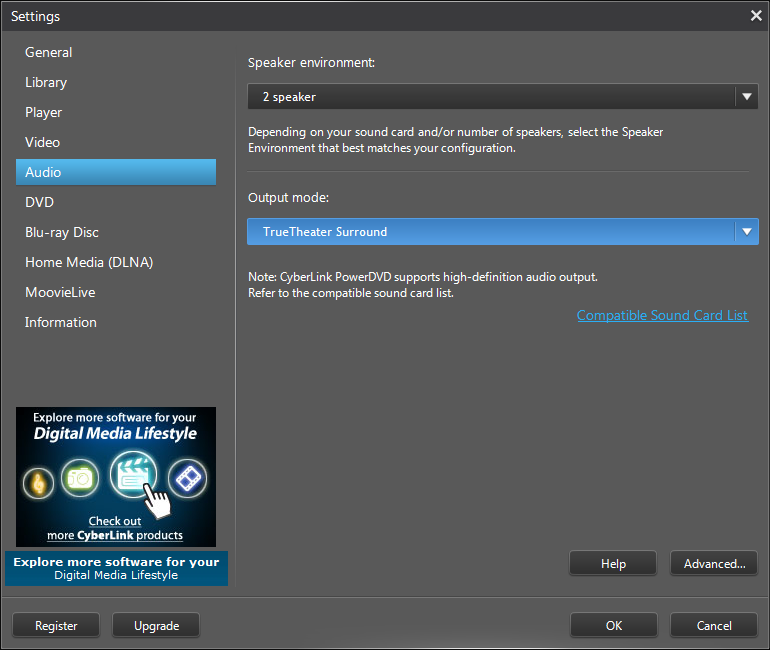
PowerDVD settings is very compact and light, but can be very misleading. In the image below you see there is a setting for # of speakers. I played around with this for a while to realise it is futile. I moved back to the default HDMI setting and in the ouput mode - voila - I changed from default to Dobly and TrueTheater Surround.
Finally, PowerDVD 12 Quick Review
What I bought was bundled with some movie and photo editor software that I will never use, but a video player for android which is actually pretty powerful. It also comes with the PowerDVD remote software which is very handy.
 |
| Great remote. It provides windows media controls as well as movie progress controls |
As for playing BluRays and using the remote - I like it. Compared to PowerDVD 9, version 12 seems to do a lot more to accomplish the same. It is slow to start, goes into all sorts of screen modes before starts playing the BluRay and sometimes I wonder if it may actually crash my computer because of the commotion it creates. In weird times it doesn't play anything and a quick close and a restart of the software does the fix.
On one occasion the crazy screen size fixing left me in a mode where I couldn't close PowerDVD or go back to my desktop. If I played the movie I would see horizontal bars of my desktop on the top and the bottom. I switched to theater move via Windows Media Player and I saw the whole software experience significantly improve.
All the best WannabeTechies!
Source(s): my experience, unlimited internet help posts
www.wannabetechie.com


 . All Mac laptops run very hot especially the newer ones which are faster and this is a required investment to not scorch your floor, desk or laps.
 ($50)
($50)