Showing posts with label tv. Show all posts

Saturday, December 15, 2012

Ramping up to CES 2013

An example of an invite to a cocktail party at CES
It's that time of the year again -- done with the turkey coma and on to the Christmas shopping and New Year's champagne with a culmination of a tough and rewarding year of work at our jobs.

It's time to getting psyched about CES 2013 in Vegas.

What biggest change do I see forthcoming in our working space?
Proliferation of touch enabled ablet pcs in our workspace. PC at the desk, touch enabled tablet at meetings, lunch and in the evening.
Here's what I'm sure to see at CES this year

  • 1080p HD phones
  • Bigger, Thinner TVs
  • Obnoxious 3D TVs and Cameras
  • 4x HD devices
  • New Tablets and Touch enabled Laptops
A lot of this is the regular annual junk that's sort of boring.

Here's what I'm looking forward to this time:
  • Our team at Wannabtechie is growing a bit more and so three of us are heading that way this year including our new lifestyle specialist who will post on the blog before we go up there for work
  • See what interesting software and interaction environments will emerge prior to the democratisation of tablets in the workplace
  • Convergence of DSLRs, Mirrorless, Compacts and Smartphones
  • Smarter Toys
  • Next Generation Consoles (Xbox 1080, PS4?)
  • Generally have fun in Vegas
  • Maybe we'll go check out Grand Canyon


Source(s):

www.wannabetechie.com


Friday, December 7, 2012

Home Theater Success: An End to PowerDVD Issues

After a hard day's work, facing problems with your home TV can be a pain.

Are you like me? See how many of these things you can check.

  1. Did you buy a a BluRay drive like this
  2. Did you hope to connect your desktop to your TV as part of a cut the cable move
  3. Were you frustrated with so many issues that you thought you should buy a blu-ray player?
  4. Could you not utilise the full power of your 5.1 or 7.1 surround system?
If any of the above, this post is for ya.

BluRay Drive
I actually bought what you call an OEM BluRay drive with bundled PowerDVD software. BluRay technology tries to keep itself ahead of pirates by constantly updating encryption and security technologies. So with newer and newer discs you buy or rent, your drive firmware needs to be updated for the drives to play correctly. If you're reading this, you probably came across the pain of upgrading firmware - it is just as complex as trying to compare Serta mattresses.

In short -- when you get PowerDVD bundled with your drive, it is the responsibility of the drive manufacturer to maintain the hardware firmware and its compatibility with the specific bundled version of PowerDVD. Of course manufacturers stop at some point. I did everything I could, contacted PowerDVD, Samsung and they kept passing the batton between each other. The hardware firmware is of course being updated but I was forced into finally buying a copy of PowerDVD Ultra 12 for the Christmas special of $39.99.

Still a rip-off, but hey I already had sunk cost in my home theater setup and it is still cheaper than cable. Now I can rely on PowerDVD to keep this version up to date for a few years.

HDMI Connection Issues
I would often come home to two very common problems.

  • No sound.
This was frustrating. Took me forever to figure out. My desktop audio is connected to my TV via an optical out as well as HDMI. Depending on the order of which I turn things on, TV, audio receiver, computer wake -- it picks HDMI or optical. And the desktop has a default playing device. Had to do some brute force restarting to figure this one out. 
  • This error message that says my computer is incapable of playing BluRays. A similar one would blame a missing AC3 codec.


Well this was kinda stupid. Of course my computer can play BluRays. But PowerDVD thought I was trying some creative technique to rip the BluRay via a bypass tunnel of the HDMI cable. I downloaded the tool, did all sorts of tests. Had to restart the computer to fix. It took me some time to realise that if I turned off and on the receiver, it would self-fix. This is a weird issue with HDMI-sleep/wake. You can literally read thousands of articles like this on the topic. Skip it, just switch off/wake 2 seconds/switch on the receiver.

True Surround Sound (>2.0)
It seems like by default my computer outputs audio to 2 channel PCM. And if you have the HDMI AC3 issues above, you definitely saw this.

Read this article about how when you use SPDIF you will definitely see 2 channel output for sure and if you use HDMI you are very likely to see a default to 2 channel output.

What does this mean? Well you're watching the latest Dark Knight Rises BluRay and the annoying thing is playing the surround and background sound on the front speakers. It also kills any multiple frequency toning that your speakers are capable of. So why bother buying 5.1 in the first place?

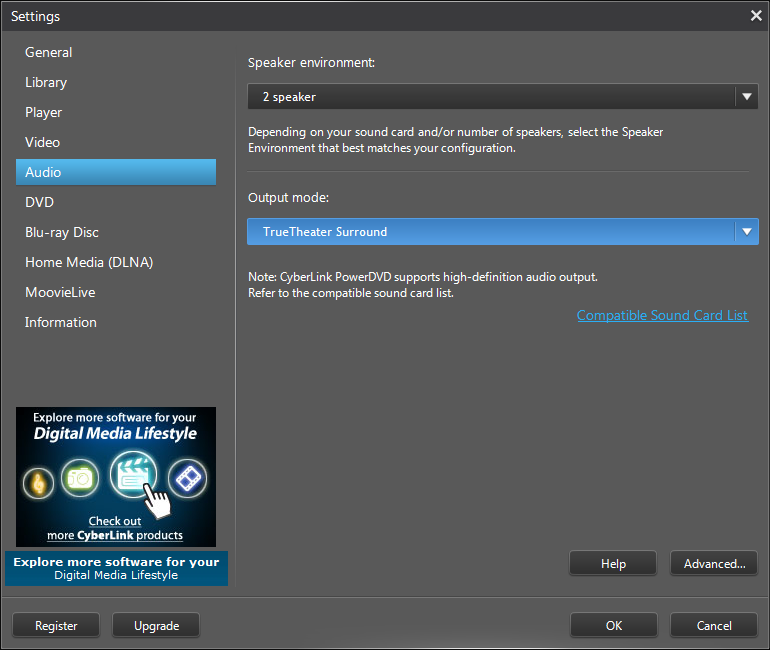
This one took me many after work nights as well to fix. When using Windows Media Player or Xbox 360, the receiver would happily default to Dolby HD to play using my 5.1 setup. That quickly localised the problem to the default PC output settings or PowerDVD. Since Windows Media Center (TV stations) were running 5.1 on channels like CBS, that means the default audio device was capable of 5.1 and therefore the problem had to be in the new version of PowerDVD 12 that I bought.

PowerDVD settings is very compact and light, but can be very misleading. In the image below you see there is a setting for # of speakers. I played around with this for a while to realise it is futile. I moved back to the default HDMI setting and in the ouput mode - voila - I changed from default to Dobly and TrueTheater Surround.


Finally, PowerDVD 12 Quick Review
What I bought was bundled with some movie and photo editor software that I will never use, but a video player for android which is actually pretty powerful. It also comes with the PowerDVD remote software which is very handy.

Great remote. It provides windows media controls as well as movie progress controls
As for the software itself, I like the colours and layout of the user interface. Given my problems above clearly the UX is subpar and this is probably because the PowerDVD team is focused on monetising product rather than improving customer experience (clearly highlighted by the # of ads I see on an expensive paid version of software).

As for playing BluRays and using the remote - I like it. Compared to PowerDVD 9, version 12 seems to do a lot more to accomplish the same. It is slow to start, goes into all sorts of screen modes before starts playing the BluRay and sometimes I wonder if it may actually crash my computer because of the commotion it creates. In weird times it doesn't play anything and a quick close and a restart of the software does the fix.

On one occasion the crazy screen size fixing left me in a mode where I couldn't close PowerDVD or go back to my desktop. If I played the movie I would see horizontal bars of my desktop on the top and the bottom. I switched to theater move via Windows Media Player and I saw the whole software experience significantly improve.

All the best WannabeTechies!

Source(s): my experience, unlimited internet help posts

www.wannabetechie.com


Wednesday, May 25, 2011

Connecting a Macbook (or Laptop) to your TV. Better than Roku/Boxee?


I’ve definely been able to use Hulu right on the laptop and it is fine. When it comes to Netflix, it gets a bit challenging for the top quality 1080p HD content. To fix this I use the computer on a cooling pad like this. All Mac laptops run very hot especially the newer ones which are faster and this is a required investment to not scorch your floor, desk or laps.

When talking about projecting to a TV I think you need to buy a mini DVI to DVI adapter and then a DVI to HDMI (or DVI or VGA depending on your TV) cable. You also need to get a computer audio (3.5mm) to RCA audio (red/white) cable. After all that, there is no guarantee that the resolution will be great. It worked great on my flatmate’s TV a few years ago but text was blurry on a TV at another person’s place.

But here’s my honest recommendation: if you had a budget of around $385
• you buy a used mac mini if you really want a mac on your TV (~$350, +about $100 for wireless keyboard and mouse)
• if you’re willing to be fine with only a browser, then you will have a lot more access to channels and tv shows designed for TV consumption with a boxee ($200) or a roku ($100) and if you really needed a mouse in addition to the remote keyboard, something like this ($50)
• $150 blu-ray player that comes built in with apps like Hulu and Netflix

I connected my super human desktop (insane core i7 config) to my <1 yr old 1080p HD tv and it looked OK for text but was awesome for video. It’s all about the light levels. A computer screen is able to manage the text on white background without burning your retina but for a TV which is set to be naturally of high dynamic range you’ll end up having to manually set the colour levels for the TV when using the computer and then go back for when watching just TV. And after about 2 weeks it became annoying trying to type for things with a wireless keyboard. It just seemed to be too much interaction for TV. I was so used to a very simple TV remote. My TV has online apps and with <3 button presses I can get to the Hulu app or the Netflix app and that is what I always use and have moved my desktop back to my desk, where it belongs. And for boxee and Roku you haves apps for each channel. You don’t need to go to comedycentral.com or whatever. Just pick the app (channel) and the show and it takes you right to the video. It is truly customised for the couch and cheaper. Source(s): www.wannabetechie.com

Wednesday, December 29, 2010

Five Steps to Cut the Cable/Satellite Cord and stream, Stream, STREAM to your TV!

If you've already read my previous post about streaming and the cloud and thinking "I'm ready, but I need concise instructions" then this is the post for you.

1. Inventory Check
So what do you have so far?
Um, you haz everything? whattayadoinhya? Go sit on the couch!

2. What do you care most about?
Movies (Tier1:2-3 months from theatrical release)
all these services allow you to purchase a movie, but the availability dates vary wildly

Movies (Tier2:2-3 months from theatrical release+shipping time)
Netflix (Blu-Ray Discs/DVD)

Movies (Tier3:1month from DVD/Blu-Ray release)
Netflix (streaming), Hulu/HuluPlus

TV Shows
Stream (Latest): Hulu/HuluPlus
Stream (Older): Netflix

Sports

Premium Content
HBO Go (just of matter of time for this to be an independent streaming service)

3. Make the most of what you have
Already have video game console (Wii, Xbox360, PS3)? Services like Pandora, Netflix, Hulu/HuluPlus, VUDU, Amazon Video on Demand are already available on these devices. Give it a whirl. Subscribe for a month and see how you like it. With an Xbox360 and AT&T uVerse you can experiment with some semi-cut the cord-services.

Have a laptop/desktop? All these services are available on a computer and probably the best environment to do a test drive. If you have the necessary cables to put your screen on your TV, give it a go to see how it looks. You could even invest in something like Veebeam which wirelessly transmits your lcomputer screen to your TV. But keep in mind that the content on computers are different definition from the content on TVs. For example the if you rented the movie Inception on your computer's Amazon VOD site it would be in 480p standard definition (SD) whereas on the Amazon app on your TV/media device you are able to rent the (HD) high definition 720p/1080p version.

4. If you're already planning to buy a....
Video game console: Keep in mind that a Wii can play CDs, Xbox360 CDs+DVDs and PS3 CDs+DVDs+Blu-Rays.
Laptop: Get one with a blu-ray player and an HDMI output. That'll make it super easy to watch Blu-Rays and online streaming content directly on your TV with just an hdmi cable.
Digital Media Center: You have three great options; Roku, Boxee or AppleTV. GigaOM has an excellent article on trying to make this decision.
Blu-ray/DVD player: Get an internet connected one. If you can wait, then wait. Black Friday 2010 had internet blu-ray players at close to $50. The prices are definitely falling as streaming becomes more popular.

5. Baby Steps
Moving away from cable is hard.
Start with a Netflix subscription on your laptop, see how it works out. Amazon Video on Demand and VUDU typically provide you with around $5 credit just for setting up an account. You can rent an HD movie to see how you like the service. With a nice HD tv and surround sound system, that's about 1/10th the cost of a movie theatre date!

I have an internet connected TV with apps on it. As new apps get released, I can download it on my TV. I have access to Amazon Video on Demand, Netflix and VUDU to name a few. I also have an Xbox 360, so I have access to the same content plus the Zune Store and ESPN3.

There is a great article by Mark Glaser @ PBS MediaShift. It is a bit dated (Jan 2010) but still worth a click here, where you can read about how others went about to cut the cord.

Good luck, Wannabe Techie!

source(s): GigaOm, PBS


Friday, December 10, 2010

Streaming and the Cloud: Is this for you?

What's this article about?

2011 is around the corner. You're thinking of cutting the cable. But you're not sure what that really means. You think that Hulu, Netflix and network sites like thewb.com are really for laptops and iPads. You say things like:
  • I don't want to watch this 1080p movie on a 14" laptop. Hold on, what the heck is 1080p! Why does my home video look grainy on my TV? I don't want peas in my soup!
  • iPads don't do gameday.
  • I don't really want to connect my laptop to my TV with a thingamajigga mumbo jumbo to save a few dollars
  • What's streaming? What is this cloud thing all about? I don't like clounds n e ways because they cause rain.
So let's tackle 'em one by one.

NTSC, PAL, SECAM and 1080p
Yeah, sounds like a whole load of baloney. Prior to purely digital content that we have today, there was really a whole bunch of baloney (complexity) around how TV content was distributed from the TV station to your home. That's the past. Fast forward to the present and the display technology in our computers are mirrored in our TVs. 480p (standard definition), 720p (high definition) and 1080p (high definition) are ways to describe screen resolution/quality.

Bullet points
  1. 1080p is high end
  2. Most US HD broadcasts are 720p. So naturally 720p is good enough if this is what your budget allows for
  3. 480p is so yesterday
So if you have a "Full HD" TV, then you're pretty much hooked up. You're ready for the future. Back to the topic at hand. While a 480p video would look great on a laptop, it ends up being not that great on a 46" TV. So whatever thoughts that go into considering a video solution for your laptop, you need to rethink that for your TV.

Next you need to get your TV "connected". In addition to a broadband internet connection you will need one of these in order of ease for us wannabe techies:

*need more help? check out this post from GigaOM
**Wii - Netflix; PS3 - Netflix, Vudu, Content Store; Xbox 360 with $50 per year Xbox live subscription - Netflix, Content Store, ESPN3 (depending on internet provider)

iPads don't do gameday?
Just checking if you're paying attention. Well, I'm trying to make a serious point here. Sports fans, cutting the cord is probably not that easy. TV fans have Hulu/Hulu Plus, Movie buffs have Netflix/Vudu. Sports fans who need their dose of live Monday Night Football - cutting the cord is going to be hard. There is a little hope with ESPN3 on the Xbox 360 with Xbox live gold subscription but the quality is a bit behind.

Is this complicated? Is it hard to do? Am I going to stuck with expensive upgrades to save a few dollars?
Dear wannabe techies: with TV bills at around $60 per month for basic content, we're talking about the potential of saving $720 per year. What are the incremental costs? Were you planning on buying the equipment anyway (TV, media device or gaming platform). Let's assume you have an HDTV, will dish out $150 on a network blu-ray player, $199 on an Xbox 360 and $50 on an annual Xbox Live subscription. You still have $321 in savings and have upgraded the technology in your home. That's enough for a monthly Hulu Plus & Netflix subscription with Blu-ray in the mail discs and two HD on demand movies. We're only talking about those with basic cable packages. Those with $100-$150/month TV content, there is a lot more money in the pocket or in other investments.

What's this cloud thing? What's streaming?
Imagine a nearing future where there are no blu-ray discs and DVDs. Think about how we consume music now -- in the form of digital MP3. Now take that digital content and put it in a server in the internet (the internet is the cloud). Audio is streamed through music services such as Pandora, Zune and Grooveshark. Similarly, this is how Netflix distributed video to households using streaming technology. The movie resides in the internet and is ready to start playing when you request it.

OK, so what does this all mean for my cable-free media strategy?
As referenced in my previous post, the lines that used to separate Hulu (TV show heaven) and Netflix (movie buff land) are getting blurry. Hulu Plus provides access to some previous season content and is required to get access to Hulu on your TV. Give the service a single month whirl and see if it really better for you than using Hulu on your computer augmented with Netflix. ESPN3.com is something you should check out to see if it a) works with your internet provider and b) has the lineup of sports events that you are interested in. That covers most of the basic content.
Moving on to on-demand, there are a bunch of options to order a movie just sitting on the couch - Xbox Live, CinemaNow, Vudu, Amazon VOD and Apple iTunes Store
Inception just released a few days ago and I thought I'd see how the cost of on demand digital content stacks up against the competitive set.


Xbox LiveVuduCinemaNowAmazon VODiTunes Store
SD (480p)n/a3.993.993.993.99
HD (720p)n/a4.994.994.99n/a
HD (1080p)n/a5.994.994.99n/a
SD Purchase(480p)16.999.9915.959.9914.99

Vudu advertises its 1080p service as HDX alluding to the blu-ray quality video and digital 5.1 HD surround sound. Formerly Vudu had an advantage here being the only digital on-demand provider to even deliver this content. Since around September 2010, CinemaNow and Amazon VOD are providing the same level of clarity for video and audio at their former 720p $4.99 price point. We wannabe techies will have to wait and see if Vudu will make any changes to their current price structure.

What's really interesting to look at is the cost of buying the digital copy of the movie. For select titles an HD version runs about $19.99. The inception DVD + Blu-Ray + Digital download is $17.98 at Walmart.com and $17.99 at Amazon.com. The prices are definitely converging and we're all living in a very exciting time.

Good night, wannabe techie!


ABC TV Shows on Netflix


Netflix is a game changer.

High speed internet in the home coupled with very affordable streaming solutions is making it very easy to cut the cable cord. For a lot of folks, that's savings of up to a $100 a month!

Sure, Netflix's massive streaming collection is mostly older movies and new movies can take upto 28 days to become available on streaming but at $7.99/month (streaming only) or $11.99/month for streaming + DVD + Blu-ray, it's a heck of a deal.

Despite all that stands for the Netflix business model (16MM subscribed households and a rocketing stock price), they're not going to sit on their pile of cash especially with rumours of Amazon and Vizio/OnLive intending to enter the streaming game. Whatever shakes out, it is nothing but good news for us wannabe techies.

In a press release from Dec 8th 2010, Netflix announced a deal with Disney-ABC that enables prior seasons of the following TV shows on the streaming service immediately, and current season airings to become available 15 days from the respective first air date. Exciting news! Here's the list...

TV Shows
  • Grey's Anatomy
  • Brothers & Sisters
  • Desperate Housewives
  • Lost
  • Ugly Betty
  • Scrubs
  • Reaper
  • Phineas and Ferb
  • Good Luck Charlie
  • Hanna Montana
  • The Suite Life of Zack and Cody
  • The Suite Life on Deck
  • Wizards of Waverly Place
  • Greek
  • Make it or Break it
  • Melissa & Joey
  • The Secret Life of the American Teenager
ABC Family Movies
  • High School Musical
  • High School Musical 2
  • Camp Rock
  • Camp Rock 2: The Final Jam
  • Beauty & the Briefcase
  • Avalon High
  • Revenge of the Bridesmaids
That's a very wide target audience. This is one of the big changes that is going to make the next couple of months a very interesting time for wannabe techies. What's the perfect home package? Should I get an internet connected TV? What about blu-ray? 5.1 HDMI 1.4 receiver? What does that even mean? Lot's of questions and we'll try to get all the answers for you, from today all the way to CES 2011 and beyond.

I'll try to talk about the components that can make a solid entertainment package, on a budget, in my next post.

Until next time... wannabe techie!

source(s): BGR